Sample Chopper Online
Drop audio, chop it into pads, play slices, and export WAV from your browser.
- Upload audio
- Auto-slice to pads
- Play instantly
- Export WAV
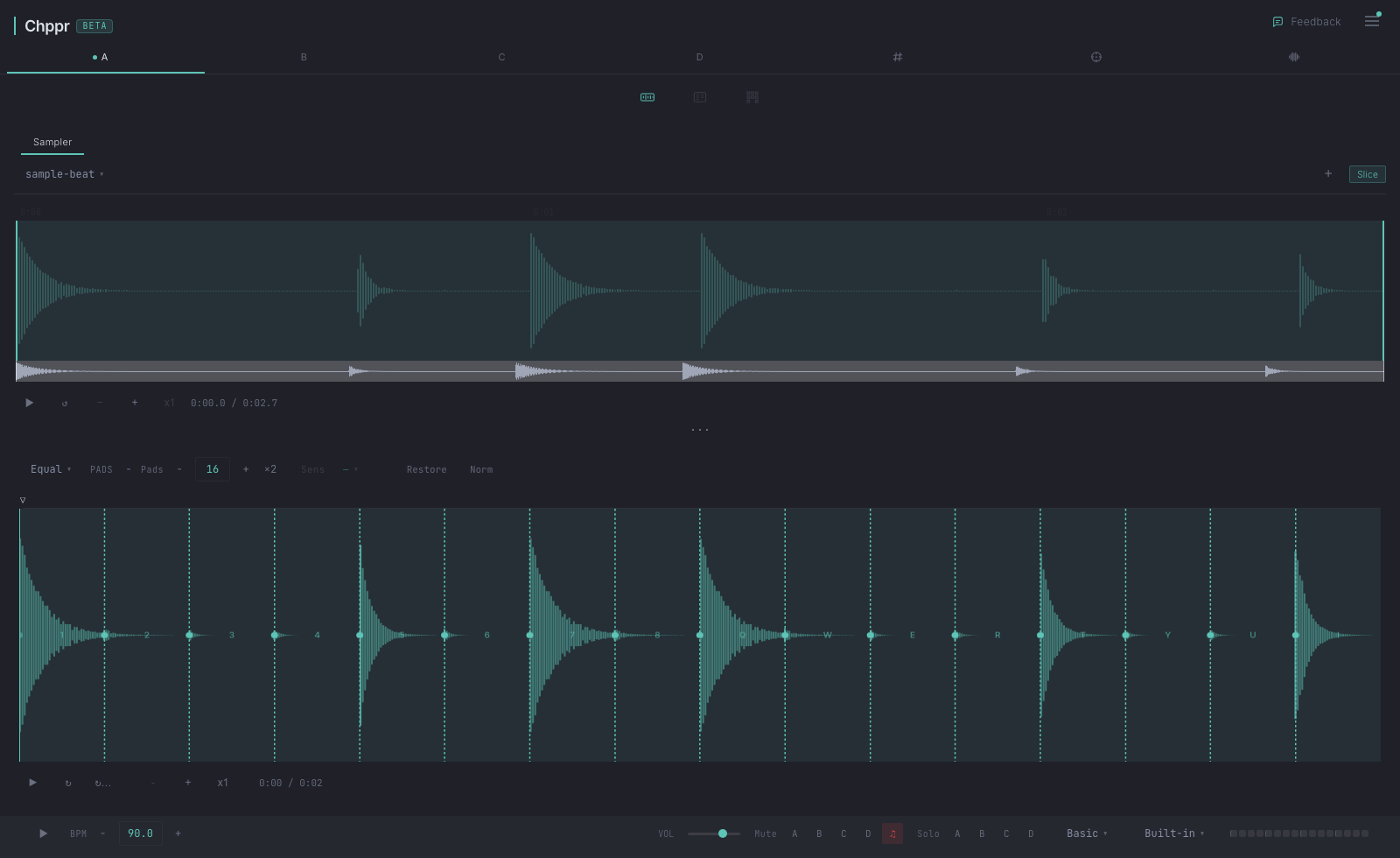
Chppr is a free online sample chopper for producers who want to move quickly from an audio file to playable chops. Drop a drum break, melody loop, vocal phrase, field recording, or any short idea, then slice it on a waveform and trigger each chop from an MPC-style pad layout.
It runs in the browser. There is no install, no plugin, and no signup required to start chopping. Your local chopping session stays on your device unless you choose to publish a share link.
If you want to chop samples from a phone or tablet, open the mobile sample chopper for phone and tablet.
If you are looking for a broader online sampler workflow, see the free online sampler in your browser.
If you want to turn chops into beat pads and drum patterns, try the beat pads and drum pads online page.
After chopping a sample, you can use Chppr as a sample sequencer online to turn slices into a beat pattern.
What you can do
- Drop audio directly into the browser.
- Use auto-detect or manual slice points to chop the sample.
- Play chops on a 16-pad layout.
- Use Chppr as a browser sampler for playable audio slices.
- Build patterns with a 4-track step sequencer.
- Arrange a full idea with BeatArc.
- Export WAV slices or a DAW-ready project.
Why it works for quick chopping
- No signup to start. Open the page, drop audio, and try the sampler before making an account.
- Common audio formats. Use browser-supported files such as WAV, MP3, FLAC, OGG, M4A, and AAC.
- Browser-first workflow. Chop a sample without installing a plugin or opening a full DAW session.
- WAV export. Take useful chops out of the browser when the idea is ready for a DAW.
When the chops are ready to become a repeating groove, use the online beat maker for sample-based pattern construction to take the next step from pads to a beat.
Use cases for sample chopping
Drum breaks
Load a break, let transient detection find the hits, then play the kick, snare, ghost notes, and fills from pads before exporting the groove.
Vocal chops
Cut a phrase into smaller pieces, move the slice points by ear, pitch or reverse a chop, and test whether the vocal works as a playable hook.
Melody loops
Slice a melodic loop into short notes or gestures, rearrange the order, and hear whether the idea still works before opening a full DAW session.
Field recordings
Turn found sounds, room noise, or small recordings into playable texture pads, then sequence the best moments into a beat sketch.
How to chop a sample
Load an audio source
Open Chppr and drop an audio file onto the page. You can also record from your microphone or load a built-in sample beat if you just want to test the workflow.
Choose the part you want to chop
Set the region on the waveform and focus on the part that has the groove, phrase, or texture you want to play.
Slice the sample
Use auto-detect for quick transient-based chops, or add and move slice points manually when you want more control.
Play and sequence the chops
Each slice becomes a pad. Trigger chops by hand, then use the step sequencer to turn the idea into a beat.
Export or keep building
Export WAV, build an arrangement with BeatArc, or save a project once the idea starts to feel worth keeping.
Who it is for
Chppr is made for quick sample-based ideas: chopping a loop, finding playable pieces inside a phrase, sketching a rhythm from slices, or preparing material to bring into a DAW. It is closer to a browser-based chop sampler than a full studio timeline.
Common questions
Can I use Chppr without signing up?
Yes. You can open Chppr, drop an audio file, chop it, play the pads, and export WAV without creating an account.
What audio formats can I chop?
Chppr works with common browser-supported formats such as WAV, MP3, FLAC, OGG, M4A, and AAC.
Can I export the chopped samples?
Yes. You can export WAV slices and keep building the idea in a DAW or inside Chppr.
Does Chppr run in the browser?
Yes. Chppr runs in a modern browser, so you can chop audio without installing a plugin or opening a DAW.
Can I use Chppr as an online sampler?
Yes. Chppr lets you load audio in the browser, chop it into playable pads, sequence sample-based ideas, and export WAV.